开发 Prompty#
实验性功能
这是一个实验性功能,随时可能更改。了解更多。
Promptflow 引入了 prompty 功能,旨在简化客户的提示模板开发。
创建 Prompty#
Prompty 规范#
在 Promptflow 中,扩展名为 .prompty 的文件被识别为 prompty。这种独特的文件类型有助于提示模板的开发。
Prompty 是一个 Markdown 文件,其前言以 YAML 结构化,封装了一系列元数据字段,这些字段对于定义模型的配置和 prompty 的输入至关重要。前言之后是提示模板,以 Jinja 格式表达。
前言中的字段
字段 |
描述 |
|---|---|
name |
提示的名称。 |
描述 |
提示的描述。 |
模型 |
详细说明 prompty 的模型配置,包括连接信息和 LLM 请求的参数。 |
输入 |
传递给提示模板的输入定义。 |
输出 |
指定 prompty 结果中的字段。(仅当 response_format 为 json_object 时有效)。 |
示例 |
提供包含输入样本数据的字典或 JSON 文件。 |
---
name: Basic Prompt
description: A basic prompt that uses the GPT-3 chat API to answer questions
model:
  api: chat
  configuration:
    type: azure_openai
    azure_deployment: gpt-35-turbo
    connection: azure_open_ai_connection
  parameters:
    max_tokens: 128
    temperature: 0.2
inputs:
  first_name:
    type: string
  last_name:
    type: string
  question:
    type: string
sample:
  first_name: John
  last_name: Doe
  question: Who is the most famous person in the world?
---
system:
You are an AI assistant who helps people find information.
As the assistant, you answer questions briefly, succinctly,
and in a personable manner using markdown and even add some personal flair with appropriate emojis.

# Safety
- You **should always** reference factual statements to search results based on [relevant documents]
- Search results based on [relevant documents] may be incomplete or irrelevant. You do not make assumptions
# Customer
You are helping {{first_name}} {{last_name}} to find answers to their questions.
Use their name to address them in your responses.

user:
{{question}}
加载 Prompty#
Prompty 的设计考虑了灵活性,允许用户在加载过程中覆盖默认模型配置。
---
name: Basic Prompt
description: A basic prompt that uses the GPT-3 chat API to answer questions
model:
  api: chat
  configuration:
    type: azure_openai
    azure_deployment: gpt-35-turbo
    api_key: ${env:AZURE_OPENAI_API_KEY}
    api_version: ${env:AZURE_OPENAI_API_VERSION}
    azure_endpoint: ${env:AZURE_OPENAI_ENDPOINT}
  parameters:
    max_tokens: 128
    temperature: 0.2
inputs:
  first_name:
    type: string
  last_name:
    type: string
  question:
    type: string
sample:
  first_name: John
  last_name: Doe
  question: Who is the most famous person in the world?
---
system:
You are an AI assistant who helps people find information.
As the assistant, you answer questions briefly, succinctly,
and in a personable manner using markdown and even add some personal flair with appropriate emojis.

# Safety
- You **should always** reference factual statements to search results based on [relevant documents]
- Search results based on [relevant documents] may be incomplete or irrelevant. You do not make assumptions
# Customer
You are helping {{first_name}} {{last_name}} to find answers to their questions.
Use their name to address them in your responses.

user:
{{question}}
用户可以指定替代参数或利用环境变量来调整模型设置。格式 ${env:ENV_NAME} 用于引用环境变量。
使用字典
from promptflow.core import Prompty

# Load prompty with dict override
override_model = {
    "configuration": {
        "api_key": "${env:AZURE_OPENAI_API_KEY}",
        "api_version": "${env:AZURE_OPENAI_API_VERSION}",
        "azure_endpoint": "${env:AZURE_OPENAI_ENDPOINT}"
    },
    "parameters": {"max_tokens": 512}
}
prompty = Prompty.load(source="path/to/prompty.prompty", model=override_model)
使用 AzureOpenAIModelConfiguration
from promptflow.core import Prompty, AzureOpenAIModelConfiguration

# Load prompty with AzureOpenAIModelConfiguration override
configuration = AzureOpenAIModelConfiguration(
    azure_deployment="gpt-3.5-turbo",
    api_key="${env:AZURE_OPENAI_API_KEY}",
    api_version="${env:AZURE_OPENAI_API_VERSION}",
    azure_endpoint="${env:AZURE_OPENAI_ENDPOINT}"
)
override_model = {
    "configuration": configuration,
    "parameters": {"max_tokens": 512}
}
prompty = Prompty.load(source="path/to/prompty.prompty", model=override_model)
---
name: Basic Prompt
description: A basic prompt that uses the GPT-3 chat API to answer questions
model:
  api: chat
  configuration:
    type: openai
    model: gpt-3.5-turbo
    api_key: ${env:OPENAI_API_KEY}
    base_url: ${env:OPENAI_BASE_URL}
  parameters:
    max_tokens: 128
    temperature: 0.2
inputs:
  first_name:
    type: string
  last_name:
    type: string
  question:
    type: string
sample:
  first_name: John
  last_name: Doe
  question: Who is the most famous person in the world?
---
system:
You are an AI assistant who helps people find information.
As the assistant, you answer questions briefly, succinctly,
and in a personable manner using markdown and even add some personal flair with appropriate emojis.

# Safety
- You **should always** reference factual statements to search results based on [relevant documents]
- Search results based on [relevant documents] may be incomplete or irrelevant. You do not make assumptions
# Customer
You are helping {{first_name}} {{last_name}} to find answers to their questions.
Use their name to address them in your responses.

user:
  {{question}}
用户可以指定替代参数或利用环境变量来调整模型设置。格式 ${env:ENV_NAME} 用于引用环境变量。
使用字典
from promptflow.core import Prompty

# Load prompty with dict override
override_model = {
    "configuration": {
        "api_key": "${env:OPENAI_API_KEY}",
        "base_url": "${env:OPENAI_BASE_URL}",
    },
    "parameters": {"max_tokens": 512}
}
prompty = Prompty.load(source="path/to/prompty.prompty", model=override_model)
使用 OpenAIModelConfiguration
from promptflow.core import Prompty, OpenAIModelConfiguration

# Load prompty with OpenAIModelConfiguration override
configuration = OpenAIModelConfiguration(
    model="gpt-35-turbo",
    base_url="${env:OPENAI_BASE_URL}",
    api_key="${env:OPENAI_API_KEY}",
)
override_model = {
    "configuration": configuration,
    "parameters": {"max_tokens": 512}
}
prompty = Prompty.load(source="path/to/prompty.prompty", model=override_model)
执行 Prompty#
Promptflow 提供多种执行 prompty 的方法,以满足不同场景下客户的需求。
直接函数调用#
加载后,Prompty 对象可以直接作为函数调用,返回 LLM 响应中第一个选择的内容。
from promptflow.core import Prompty

prompty_obj = Prompty.load(source="path/to/prompty.prompty")
result = prompty_obj(first_name="John", last_name="Doh", question="What is the capital of France?")
测试 Prompty#
流测试#
使用输入或示例文件执行和测试您的 Prompty。
# Test prompty with default inputs
pf flow test --flow path/to/prompty.prompty

# Test prompty with specified inputs
pf flow test --flow path/to/prompty.prompty --inputs first_name=John last_name=Doh question="What is the capital of France?"

# Test prompty with sample file
pf flow test --flow path/to/prompty.prompty --inputs path/to/sample.json
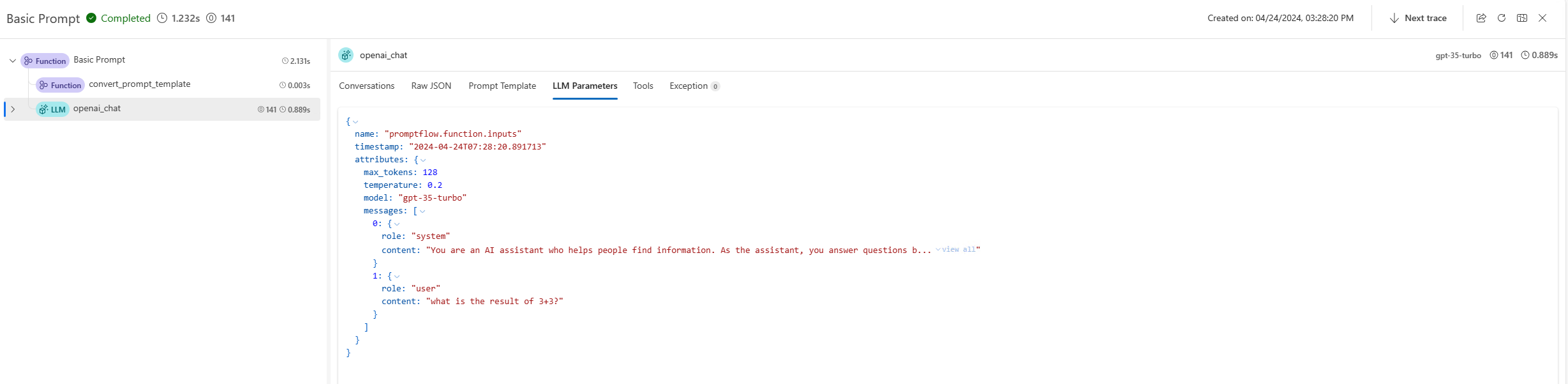
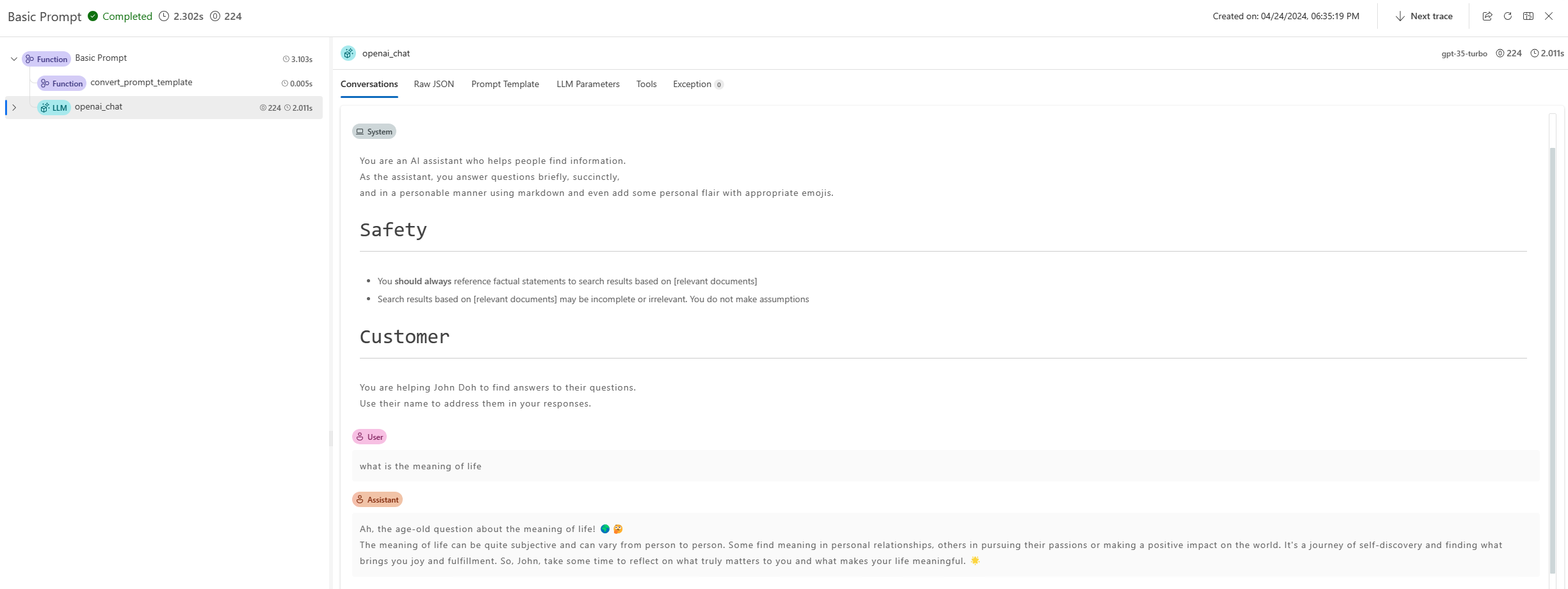
终端中将提供一个跟踪链接,用于可视化此命令的内部执行详细信息。对于 Prompty,用户可以在跟踪 UI 中找到生成的提示、LLM 请求参数和其他信息。了解更多。
from promptflow.client import PFClient

pf = PFClient()

# Test prompty with specified inputs
result = pf.test(flow="path/to/prompty.prompty", inputs={"first_name": "John", "last_name": "Doh", "question": "What is the capital of France?"})

# Test prompty with sample file
result = pf.test(flow="path/to/prompty.prompty", inputs="path/to/sample.json")
使用交互模式测试#
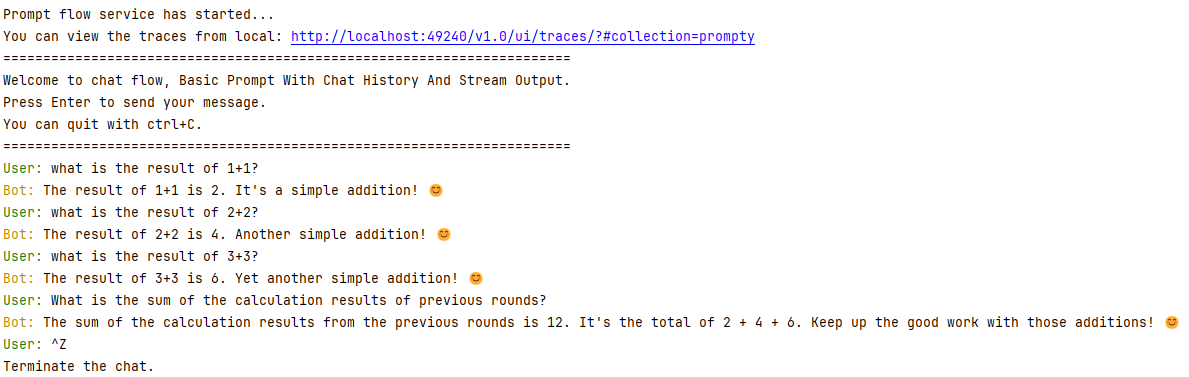
Promptflow CLI 还提供交互式聊天会话以测试聊天流。
pf flow test --flow path/to/prompty.prompty --interactive
---
name: Basic Prompt With Chat History
description: A basic prompt that uses the GPT-3 chat API to answer questions
model:
  api: chat
  configuration:
    type: azure_open_ai
    azure_deployment: gpt-35-turbo
    connection: azure_open_ai_connection

  parameters:
    max_tokens: 128
    temperature: 0.2
inputs:
  first_name:
    type: string
  last_name:
    type: string
  question:
    type: string
   chat_history:
    type: list
sample:
  first_name: John
  last_name: Doe
  question: Who is the most famous person in the world?
  chat_history: [ { "role": "user", "content": "what's the capital of France?" }, { "role": "assistant", "content": "Paris" } ]
---
system:
You are an AI assistant who helps people find information.
As the assistant, you answer questions briefly, succinctly,
and in a personable manner using markdown and even add some personal flair with appropriate emojis.

# Safety
- You **should always** reference factual statements to search results based on [relevant documents]
- Search results based on [relevant documents] may be incomplete or irrelevant. You do not make assumptions
# Customer
You are helping {{first_name}} {{last_name}} to find answers to their questions.
Use their name to address them in your responses.

Here is a chat history you had with the user:
{% for item in chat_history %}
   {{item.role}}: {{item.content}}
{% endfor %}

user:
  {{question}}
终端输出
批量运行 Prompty#
要在 Promptflow 中执行 Prompty 的批量运行,您可以使用以下命令
pf run create --flow path/to/prompty.prompty --data path/to/inputs.jsonl
要在 Promptflow 中执行 Prompty 的批量运行,您可以使用以下 SDK
from promptflow.client import PFClient

pf = PFClient()
# create run
prompty_run = pf.run(
    flow="path/to/prompty.prompty",
    data="path/to/inputs.jsonl",
)
pf.stream(prompty_run)
在执行批量运行时,Promptflow 提供了一个跟踪 UI 来可视化运行的内部执行详细信息。此功能允许您跟踪数据文件中每一行的执行详细信息,包括提示和 LLM 请求参数。了解更多。
例如,在启动 Prompt flow 服务后,您可能会在终端中看到如下输出
Prompt flow service has started...
You can view the traces from local: http://127.0.0.1:49240/v1.0/ui/traces/?#run=prompty_variant_0_20240424_152808_282517
[2024-04-24 15:28:12,597][promptflow._sdk._orchestrator.run_submitter][INFO] - Submitting run prompty_variant_0_20240424_152808_282517, log path: .promptflow\.runs\prompty_variant_0_20240424_152808_282517\logs.txt
跟踪 UI 将记录数据文件中每一行的执行详细信息,提供批量运行性能和结果的全面视图。